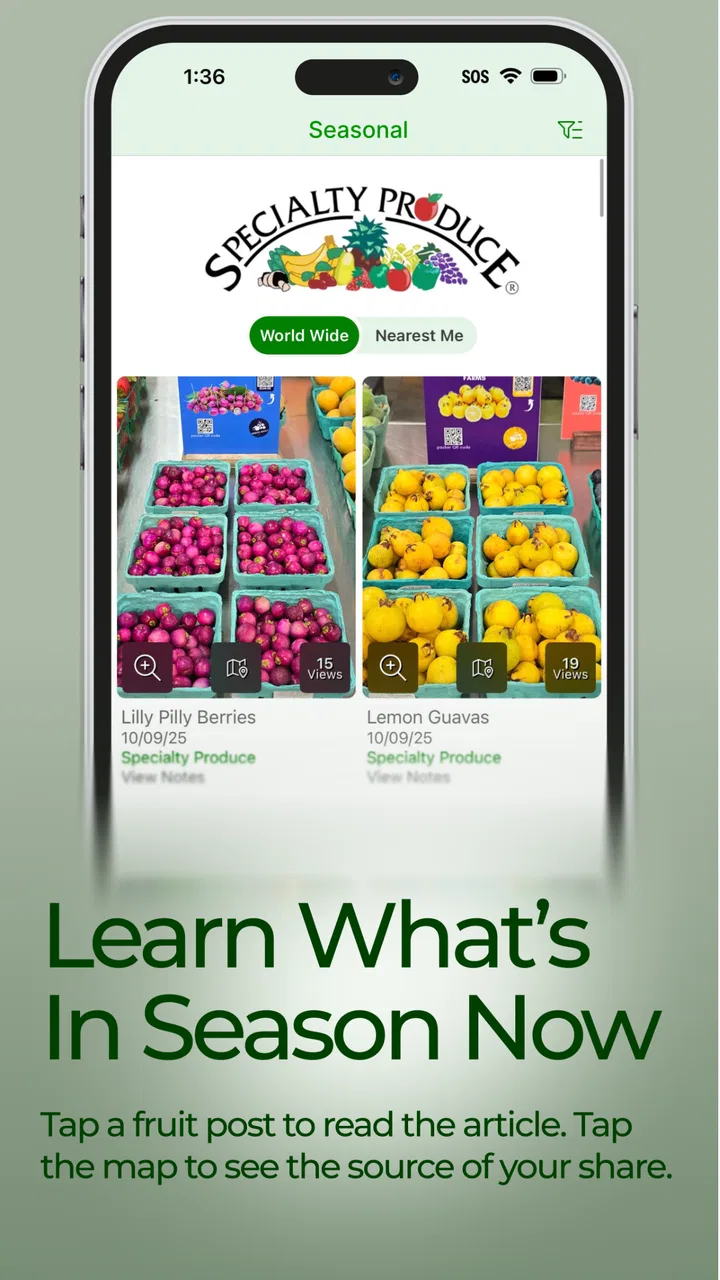
Specialty Produce
- 3.5
- Rating
- 100.00K
- Installs
- Free
- Price

 Analysis by App-foxy
I approached Specialty Produce as a food and drink reference rather than as a recipe app or a shopping service. Its central idea is simple: fruit and other produce become more useful when you understand their background, seasonality, appearance, flavor, and handling. That makes it most appealing to curious home cooks, market shoppers, students, and anyone who regularly buys unfamiliar ingredients.
The app is published by Specialty Produce Productions and is free to install, with optional in-app purchases ranging from $2.99 to $24.99 per item. It is rated for Everyone, runs on operating systems version 11 or later, and currently appears as version 8.4.3. I would not judge it by the simplicity of its store summary. The value is in how much more confidently it can make you approach produce that you would otherwise ignore at a market or grocery store.
My experience was positive overall, but not effortless. The useful information is only helpful if you can reach the right entry quickly, interpret it in the context of what you are holding, and recover sensibly when the app does not behave as expected. That practical side matters more here than flashy presentation.
You May Also Like

 Blood Strike: 2.5 Anniversary
Blood Strike’s Loadouts Turn Every Drop Into a Tactical Gamble
A close look at Blood Strike’s custom loadouts: how fast access to signature weapons reshapes its battle royale rhythm, rewards preparation, and narrows the gap between fights.

 Pandora - Music & Podcasts
Pandora’s Music Is Easy to Start, but Harder to Recover
Pandora’s strength is its low-effort path from a seed to a station. Its weak spot is how much confidence it asks you to place in connection, setup, and quiet recovery.

 8 Ball Pool
 Is Built on Rivalries, Rematches, and Routine
A close look at the rivalries, rematches, shared routines, and unanswered safety questions that turn a quick pool match into a persistent mobile community.

 Samsung Music
’s Quiet Strength Is Playing What You Already Own
Its reach comes less from spectacle than from dependable access to a personal library. That simplicity is both the app’s strongest retention engine and its ceiling.

 AccuWeather: Weather Radar
AccuWeather Review: A Quick, Clear Forecast for Everyday Decisions
For everyday plans, the best forecast is the one you can understand quickly. AccuWeather makes rain timing, radar, and local conditions easy to act on, with a few trade-offs.

 Hill Climb Racing
Why Hill Climb Racing Still Turns Crashes Into One More Run
A tiny car, a bumpy hill and one more upgrade: Hill Climb Racing keeps resurfacing because its simple chaos makes every near-miss feel personal.
More From Our News Desk
View All News


Finding your way through an ingredient reference
I find it easiest to get useful answers from a produce reference when I begin with a specific decision, not just a broad urge to browse. I’ll look at how to turn an unfamiliar ingredient into a practical choice—what to notice, what to compare, and how to avoid buying more than I can use—before considering where this kind of guidance fits into everyday shopping.
Where first-time users are likely to get stuck
The first adjustment is understanding what kind of tool this is. If you open it expecting a meal planner, a barcode scanner, or a conventional recipe collection, the experience may feel indirect. Its strength is ingredient knowledge. You are not simply asking what to cook tonight; you are trying to identify what a produce item is like, whether it suits a dish, and how to treat it once you bring it home.
That distinction changes the best way to browse. Instead of searching only for a finished recipe, I found it more useful to begin with a question such as, “What can I do with this unusual fruit?” or, “Which version of this ingredient will work with the salad I am preparing?” This turns the app into a decision aid. It is especially handy when a display at a farmers market contains several varieties that look similar but may differ in texture or flavor.
Another possible stumbling block is expecting every entry to answer the same question in the same order. Reference apps often require a little reading. One ingredient page may be most useful for identification, while another may help more with preparation or selection. I recommend scanning the whole entry once before jumping to a single detail. That prevents the common mistake of deciding that an ingredient is unsuitable simply because its most interesting information was farther down the page.
The average rating is 3.5 from around 900 ratings, with around 260 written reviews. I read that as a sign that the app has a clear audience but will not satisfy everyone equally. People who enjoy exploring produce can get real value from it; people wanting instant recipe automation may find the experience slower and less direct.
Setup checks that prevent avoidable frustration
Before relying on the app during a shopping trip, I would install it while connected to a stable network and open several entries at home. This gives you a chance to learn the navigation without standing in a crowded aisle. It also lets you confirm that the version available on your device is compatible, since the stated minimum is operating system version 11 or later.
Keep the first test deliberately small. Search for one familiar item, then one less familiar item, and compare how you move between them. This is a better setup check than immediately trying to research an entire basket. If the familiar entry loads but an unfamiliar one does not, the problem may be a search term or spelling choice rather than the installation itself.
I also recommend deciding what you want from the app before opening it. A shopper looking for a ripe item needs different information from a cook choosing a substitute or a parent trying to introduce a new fruit at home. Writing that question mentally takes only a moment, but it keeps the browsing session focused and makes the app feel much less like an encyclopedia.
Because the app has optional purchases, I would also treat the free experience as a trial of the workflow rather than assuming every useful part will be available without cost. The sensible approach is to learn how the free material fits your habits first. If the reference style does not help you during ordinary shopping, paying for additional material is unlikely to solve that basic mismatch.
A practical workflow for shopping and cooking
My preferred workflow begins before leaving home. If I am planning a meal around produce, I use the app to investigate one or two ingredients and note the qualities that matter: how the item should look, what kind of eating experience to expect, and whether it seems suited to the role I have in mind. I then shop with a narrower goal instead of buying something merely because it looks unfamiliar.
At the market, I use it as a comparison tool rather than as a reason to stand still for ten minutes. I check the entry, inspect the actual produce, and make the final decision with both sources in mind. The app can provide context, but it cannot replace your own judgment about bruising, firmness, smell, or whether the item is at a stage you will enjoy eating.
At home, the most useful step is to revisit the entry before preparation. This is where a vague purchase becomes a manageable ingredient. I like to check the information again while the produce is on the counter, then decide whether to eat it raw, combine it with familiar flavors, or reserve it for another meal. That two-stage process—shopping first, preparation later—reduces impulse purchases and makes experimenting less wasteful.
A realistic example would be a Saturday market visit. I notice a fruit I have never bought, open the relevant entry, and learn enough to decide whether its flavor profile fits a breakfast bowl. I buy only one, take it home, and use the app again before cutting it. If the result is not what I expected, I have learned something without committing an entire week’s grocery budget to an unfamiliar ingredient. That is a small but meaningful advantage over guessing from appearance alone.
How to recover when the workflow breaks
When a search does not lead where I expect, I avoid repeating the same query immediately. I try a simpler name, remove descriptive words, and check whether I am searching for the produce itself rather than a prepared dish. Unusual varieties can be described differently by shoppers, labels, and reference material, so a failed first search is not necessarily an app failure.
If a page seems slow or incomplete, I first return to the main browsing area and open another familiar entry. That simple comparison helps separate a problem with one search from a broader loading issue. I also close and reopen the app before making more complicated changes. Restarting is not glamorous, but it often saves time and avoids turning a temporary problem into a confusing setup problem.
For a shopping trip, I would not make the app my only source of information. If the connection is unreliable, take a quick note of the ingredient name and continue shopping; you can investigate it later. This is one of the most important trade-offs: the app is excellent as a companion for curiosity, but it should not be the sole support for a time-sensitive purchase or a meal that depends on one unfamiliar item.
When optional content is involved, I would check the purchase screen carefully before confirming anything. The listed range runs from $2.99 to $24.99 per item, so the difference between a small addition and a larger one is significant. I prefer to buy only after identifying a specific gap in my use, not because I feel pressured to unlock everything at once.
When the app is not the cause of the problem
Produce itself is inconsistent, and that can make an app seem wrong when the real issue is the ingredient in front of you. A fruit may be underripe, overripe, chilled, bruised, or simply different from the example you imagined. Reference information can guide your expectations, but it cannot guarantee that every piece from every shop will taste identical.
Storage is another source of confusion. If an ingredient tastes flat after being kept too cold, or deteriorates because it was left exposed, the app is not necessarily at fault. I use its guidance as a starting point, then adjust based on the condition of the actual item. This is particularly important for anyone who treats reference text as a rigid timetable rather than practical advice.
There is also a human factor. If you search while distracted, rush through an entry, or confuse two similarly named varieties, the resulting decision may be poor even when the app is functioning normally. My best results came from slowing down for one minute, confirming the exact ingredient, and reading enough context to understand what I was choosing.
Compared with ordinary web searches, Specialty Produce feels more focused when I already know that my question concerns produce. A general search engine may offer more breadth, but it can bury useful information beneath recipes, advertisements, and unrelated results. Compared with a recipe app, this tool is better before the recipe stage: it helps me decide whether an ingredient deserves a place in the dish at all. Compared with asking a market employee, it is more private and available at any time, though a knowledgeable seller may still be better for judging the particular item in front of you.
Who will get the most from it
I would recommend it to home cooks who want to expand beyond familiar apples, citrus, tomatoes, and greens without making every experiment feel risky. It also suits culinary learners who want ingredient context rather than only step-by-step instructions. A parent could use it as a conversation starter about new foods, while a shopper might use it to make a more informed choice when a display includes something unfamiliar.
Its value is less obvious for someone who buys the same produce every week and wants only quick recipes. In that case, a recipe-first app or a simple shopping list may be more efficient. I would also hesitate to recommend it to anyone using an older device that cannot meet the minimum operating-system requirement, or to a user who expects every answer to be available instantly without reading.
One non-obvious benefit is that it can change how you evaluate variety. Instead of asking only whether an ingredient is “good,” you start asking whether it is appropriate for a particular meal, texture, or level of ripeness. That leads to better buying decisions. The trade-off is that the app rewards active curiosity; it does not remove the need to taste, compare, and learn from your own results.
My practical verdict after using it
With over 100,000 installs, the app has clearly reached beyond a tiny specialist audience, but I would still describe it as a focused reference rather than an essential kitchen utility. Its free entry point makes it easy to test, and the Everyone rating makes it suitable for broad household use. The developer has built something most useful when you are willing to pause and investigate an ingredient instead of rushing straight to a recipe.
I like the way it supports a complete produce workflow: identify an unfamiliar item, make a more thoughtful purchase, revisit the information at home, and adjust your preparation based on the actual ingredient. The strongest insight is that this process can reduce waste. Buying one unfamiliar item with a clear plan is far better than buying several on impulse and discovering later that none fits your meals.
The limitations are equally clear. It is not the fastest choice for routine cooking, it cannot inspect the physical quality of your produce, and optional purchases mean that heavier use may cost more than the initial free download suggests. Search habits and reliable access also matter. If those points sound acceptable, I think Specialty Produce is worth trying, especially for market shoppers and cooks who want to understand ingredients rather than treat them as interchangeable.
My final recommendation is to install it before your next deliberate produce experiment, test it with one familiar item and one unfamiliar one, and judge it by whether it improves your buying and preparation decisions. Its real strength is not replacing your judgment, but giving that judgment better context. For me, that makes it a worthwhile companion for curious food shopping, even though it is not the right tool for every kitchen task.
FAQs for Specialty Produce
01What is Specialty Produce, and what can I use it for?
Specialty Produce is a food-discovery and ingredient-reference app focused on fruits, vegetables, herbs, mushrooms, and other specialty ingredients. It is useful for home cooks, chefs, students, and anyone who wants to learn about unfamiliar produce. You can explore ingredient descriptions, seasonality, culinary uses, storage suggestions, flavor information, and preparation ideas before buying or cooking.
02Does Specialty Produce provide recipes or only ingredient information?
The app is primarily designed as an ingredient guide rather than a complete recipe platform. Its information can help you understand how a particular item tastes, when it is available, how to store it, and how it may be prepared. You may find serving or usage suggestions, but users looking for step-by-step meal planning should not expect the same recipe depth as a dedicated cooking app.
03Can Specialty Produce help me identify unfamiliar fruits and vegetables?
Yes, the app is particularly helpful when you encounter produce that is difficult to recognize at a market, restaurant, or grocery store. Entries generally include names, photographs, descriptions, and practical details that make comparison easier. However, identification should be treated as informational guidance, not a guarantee, especially when several varieties look similar or regional names differ.
04Is Specialty Produce useful for professional chefs and restaurant workers?
Specialty Produce can be valuable for chefs, culinary students, bartenders, food educators, and restaurant staff because it provides quick background information on less common ingredients. It may support menu development, purchasing decisions, and customer explanations. Nevertheless, professionals should still confirm current availability, pricing, supplier details, and exact cultivar information directly with growers or distributors.
05Does the Specialty Produce app require an internet connection or collect personal information?
Some parts of the app may require an internet connection to load images, ingredient pages, updates, or other online content, so offline access should not be assumed. Before downloading, review the current App Store or Google Play listing and the developer’s privacy policy for details about permissions, analytics, account requirements, and data collection, since these policies can change with updates.
Pros
- Detailed information on thousands of fruits
- vegetables
- and specialty ingredients.
- Helpful flavor profiles and usage ideas for unfamiliar produce.
- Seasonal guidance helps users discover produce at its best.
- Useful reference for cooks
- shoppers
- and food enthusiasts.
- Clean interface makes browsing produce categories straightforward.
Cons
- Coverage may vary by region and not reflect local market availability.
- Some entries may lack pricing or nearby purchasing information.
- The large catalog can feel overwhelming for first-time users.
- Recipes and preparation suggestions may be limited for some items.
- Requires internet access for the most complete information.

Specialty Produce
Gallery